

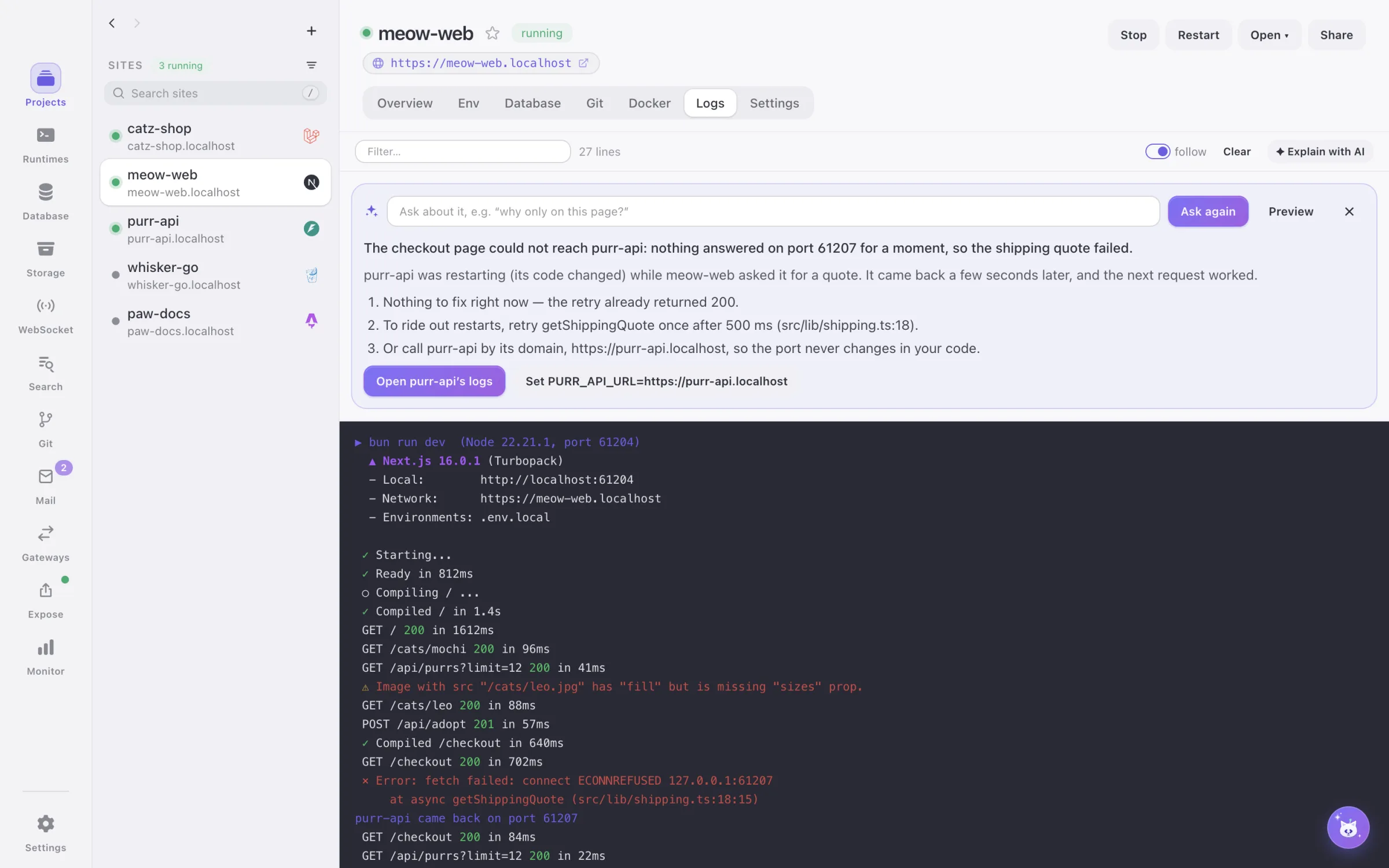
Explain & fix errors
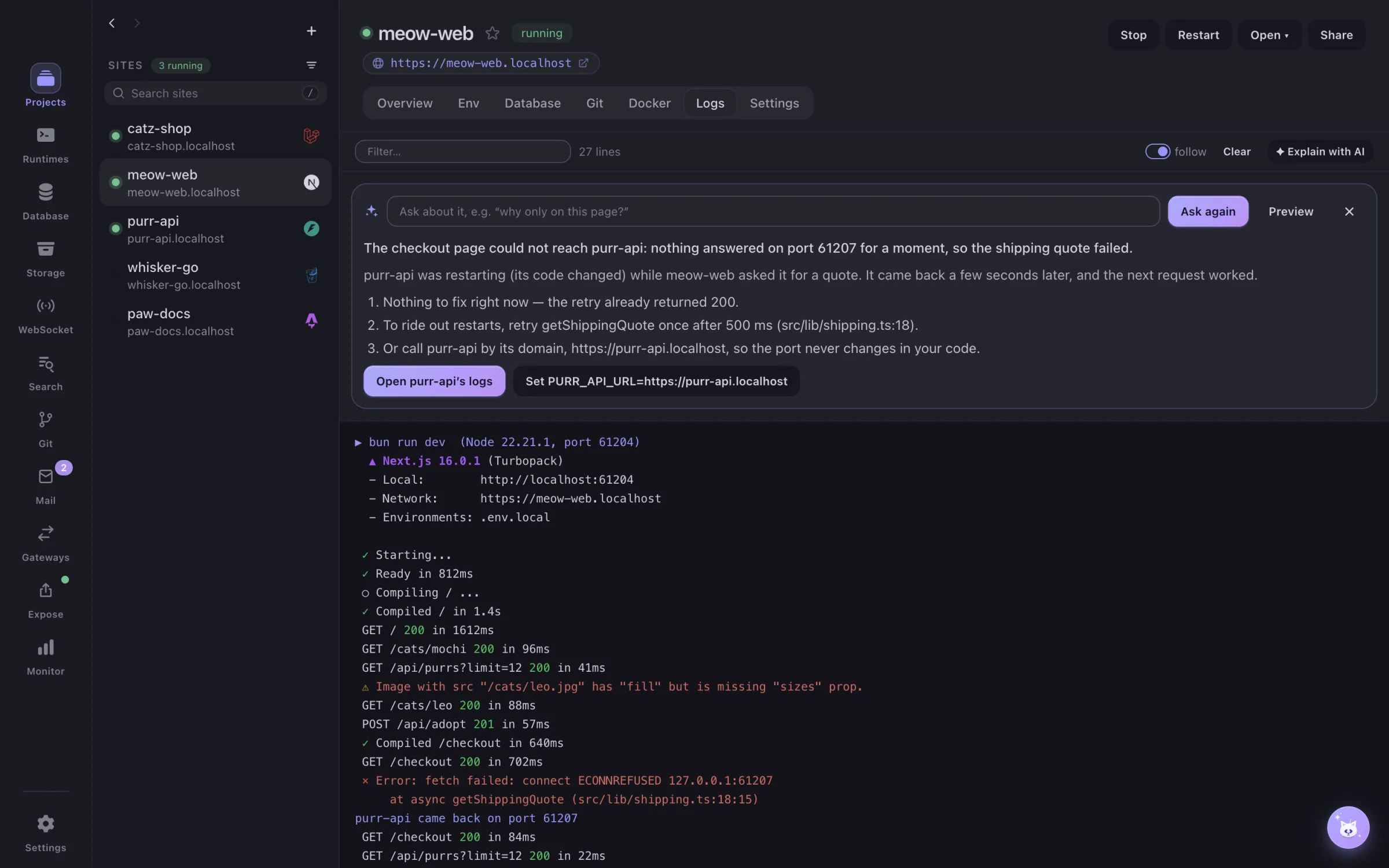
A crashed site or error lines in Logs
The answer explains what went wrong and offers one-click DevCatz actions: install the missing extension, pick another port, run migrate, switch the Node version, install dependencies.
Local dev environment
Finally, someone herds the cats.
A local development environment manager, free and open source, from one menu bar app. DevCatz runs your sites on https://*.localhost with the runtimes, databases, object storage, search engines, WebSocket servers, mail, tunnels, gateways and Docker they need — and explains what breaks in plain words. No subscription, no Pro tier, no catch.
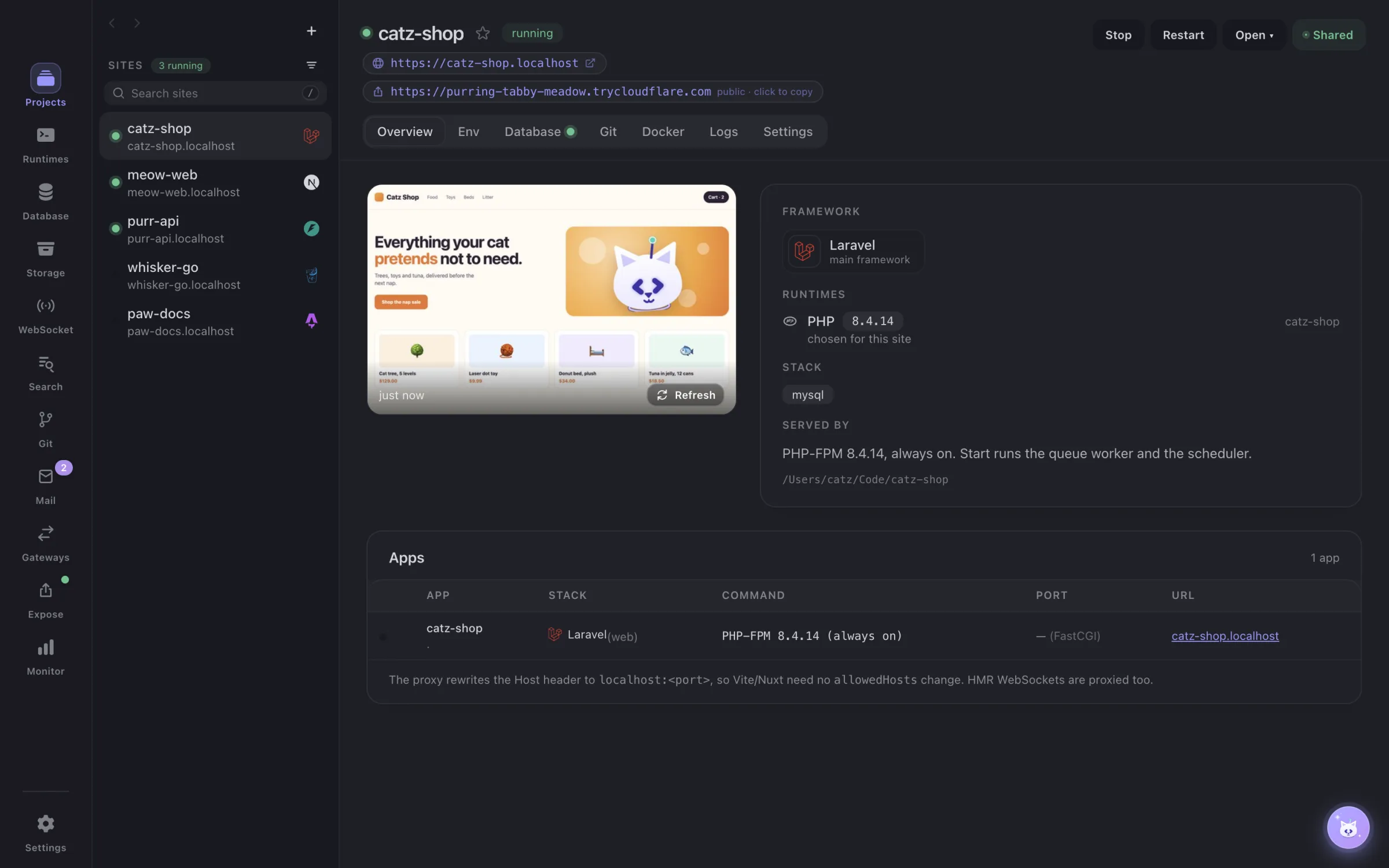
running · https://catz-shop.localhost · Laravel · PHP 8.4 · MySQL 8.4 · 2 ms
 PHP
PHP Node.js
 Bun
Bun Python
 Go
Go Laravel
 Next.js
 Nuxt
Nuxt Django
 FastAPI
 Astro
Astro SvelteKit
 NestJS
 Gin
Gin WordPress
 Symfony
 Flask
Flask Vite + React
 Vite + Vue
 Express
 CodeIgniter
In the app
Real screens from the app — no stuffed cats, no mock-ups. Keep scrolling: it plays.
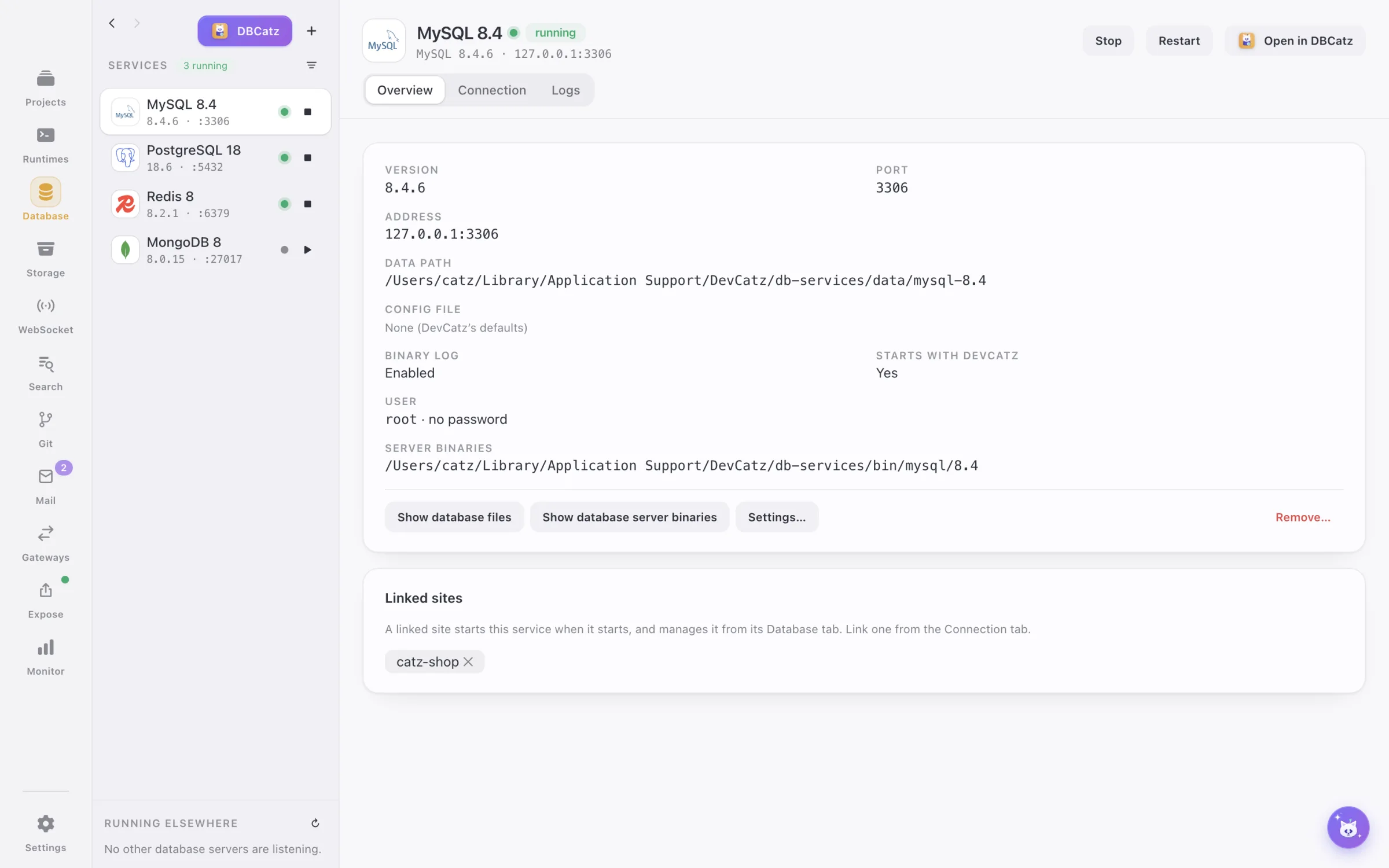
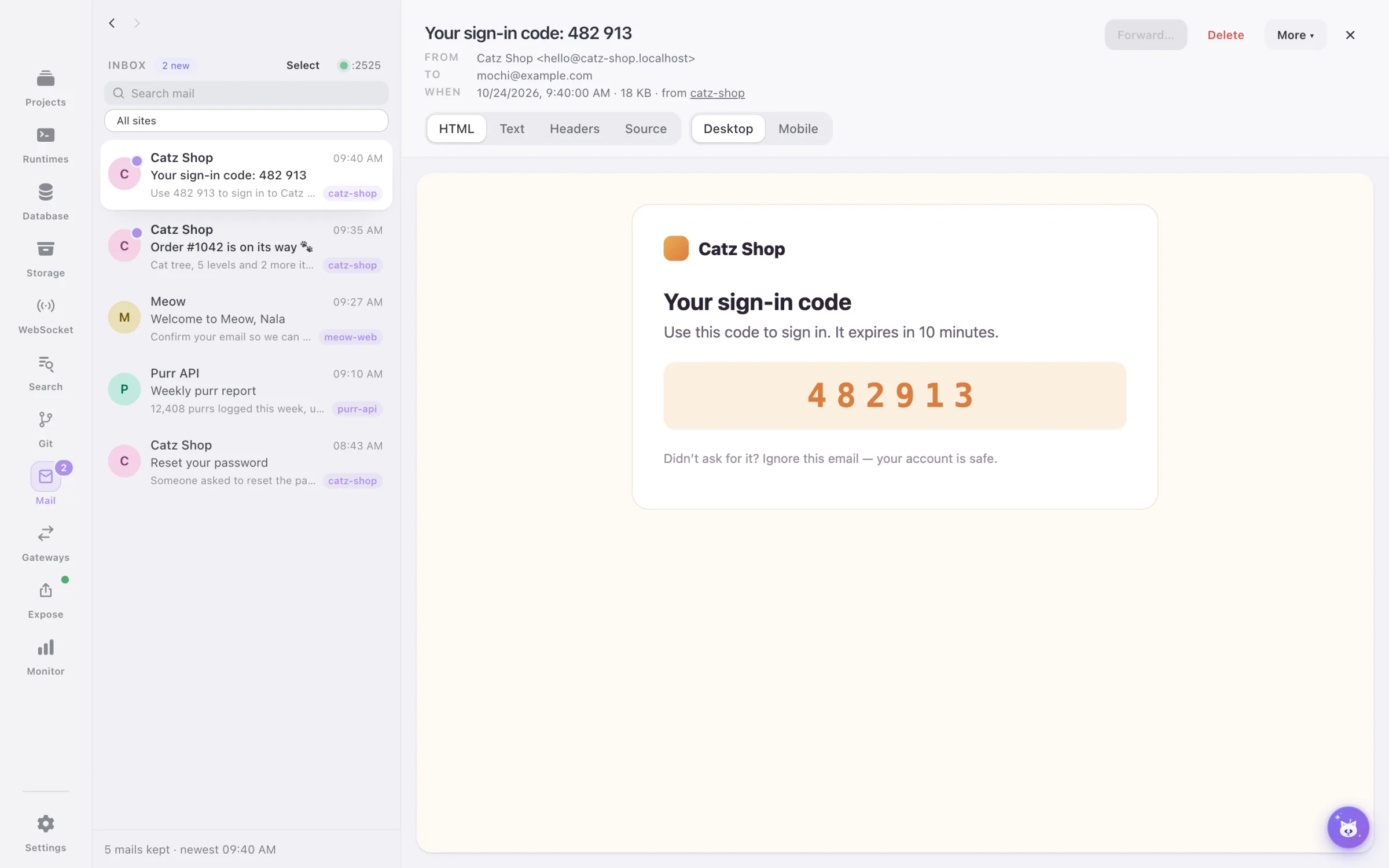
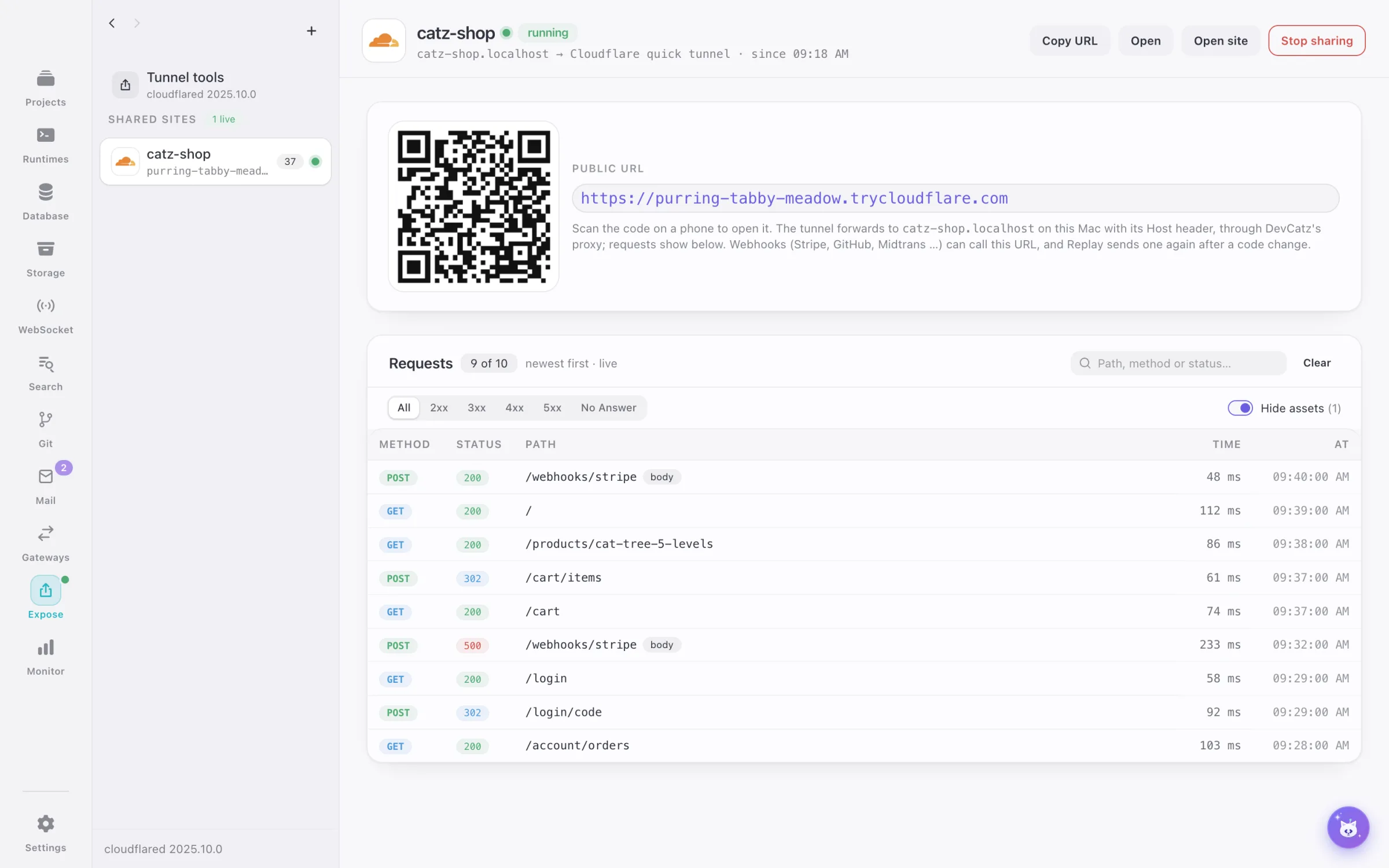
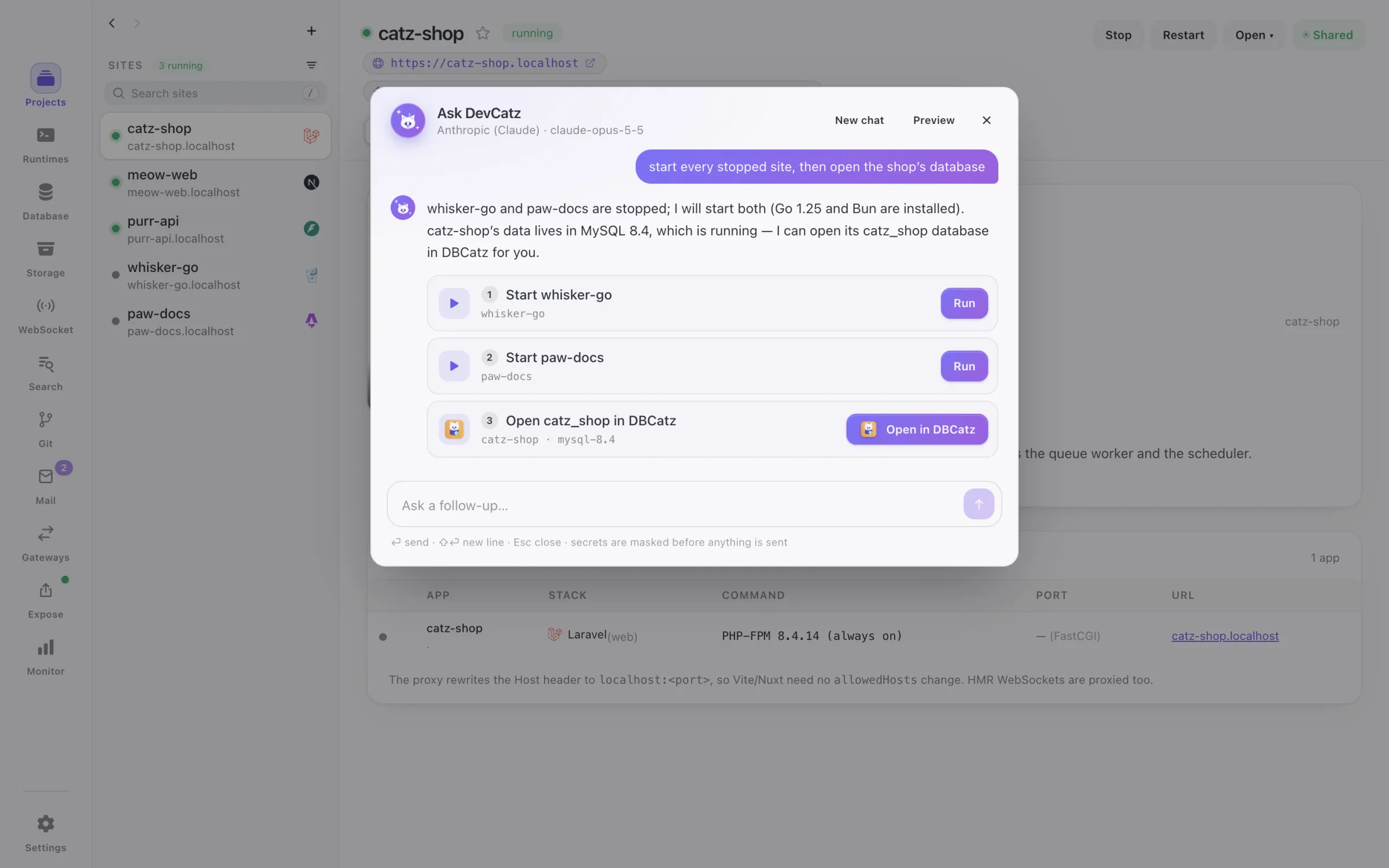
Detected stacks
Drop a folder in and DevCatz sniffs out what it is — PHP → Python → Node.js / Bun → Go; a Laravel app with a package.json is still Laravel. Monorepos: every app found, Go modules inside a JS monorepo too. Each framework comes with its own logo and tasks.
Laravellaravel.comNext.jsnextjs.orgNuxtnuxt.comDjangodjangoproject.comFastAPIfastapi.tiangolo.comAstroastro.buildSvelteKitsvelte.devNestJSnestjs.comGingin-gonic.comWordPresswordpress.orgSymfonysymfony.comFlaskflask.palletsprojects.comVite + Reactvite.devVite + Vuevuejs.orgExpressexpressjs.comCodeIgnitercodeigniter.comAlso recognised
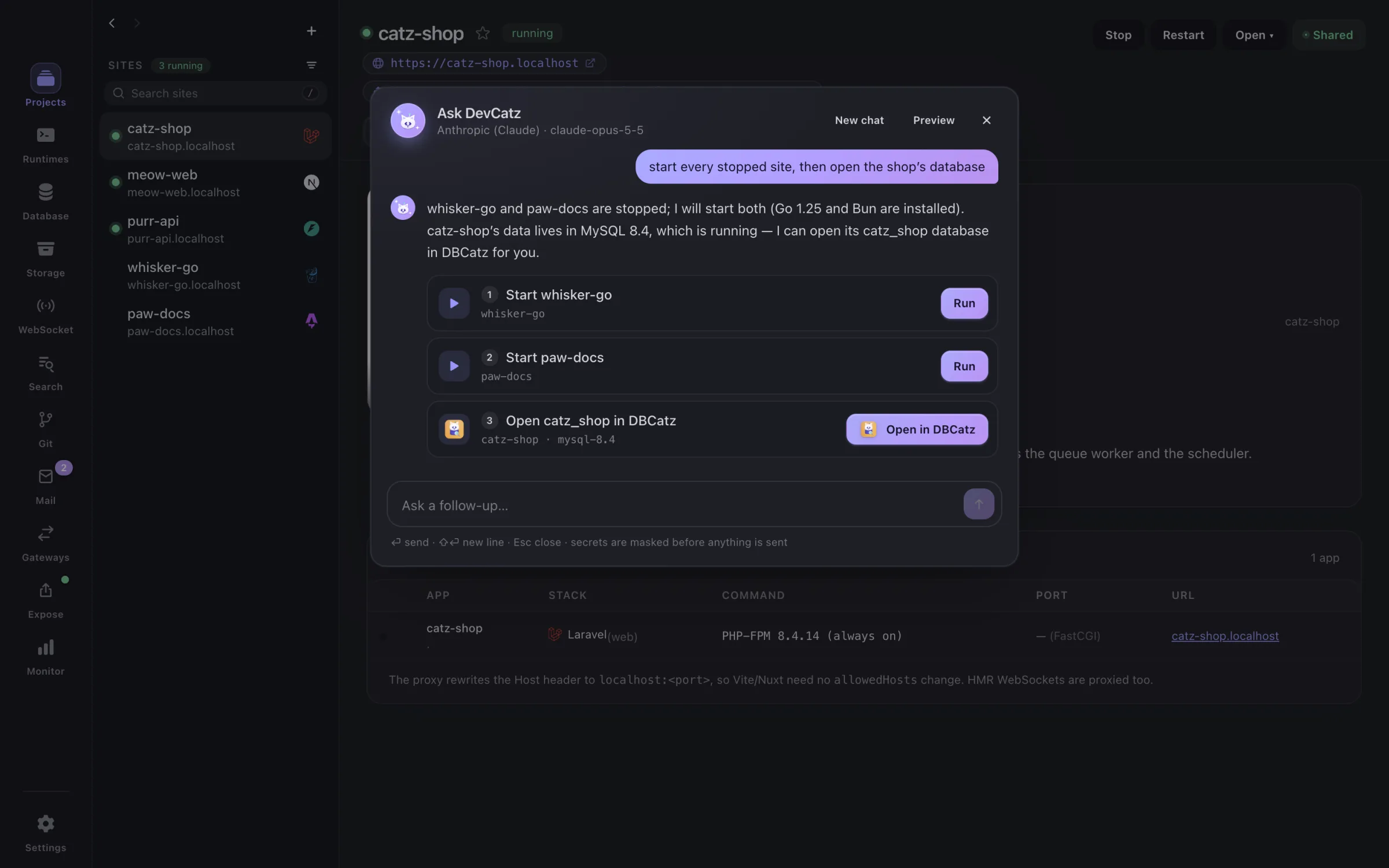
> my site just shows a white screen
AI, where DevCatz has the context
You describe, the cat does. DevCatz knows your sites, ports, runtimes and logs, so a sentence becomes real actions — and a red error becomes a sentence you understand, with the fix as a button.
Asks before every action
Nothing runs on its own. Every step is a button you press.
Only the context, never your code
Site names, ports, status and the lines you picked — .env values and secrets are scrubbed first.
Keys stay in your Keychain
Encrypted by macOS, never in a settings file.
Set the provider once
Claude by default; one setting shared by every Catzoid app.
A crashed site or error lines in Logs
The answer explains what went wrong and offers one-click DevCatz actions: install the missing extension, pick another port, run migrate, switch the Node version, install dependencies.
“start shop and its database”, “give shop its own Redis index”
Plain words mapped to DevCatz actions — always shown and confirmed before anything runs.
From the staged diff, in the repository’s own style
Diffs are only sent when you press the button.
Docker build failures · Dockerfile edits from plain words · .env explanations · search query syntax · webhook payloads → a handler for your framework
Each helper is a switch of its own; all off when AI is off.
Every request, before it goes out
.env values, tokens and passwords are scrubbed, home paths become ~. Suggestions are buttons you click, never commands that run by themselves.
Off until you turn it on · one connection, shared with every Catzoid app ·Claude (default)OpenAIGeminiDeepSeekZ.aiMistralxAIGroqOpenRouterOllamaany OpenAI-compatible server
The MCP with the cats insidesoon
One MCP server for the whole Catzoid family. Your AI assistant — Claude, Cursor or any other that speaks MCP — will be able to start and stop a site, read its logs, write the .env lines it needs in DevCatz, and reach the other cats you have installed through the same connection. One connection, every cat — and you hold the keys: only what you allow, nothing runs without you seeing it.
Works with ClaudeGeminiGPTGLM— any app that speaks MCP.
Meet MCatzPEvery site
Add a folder and DevCatz serves it on its own name. No Docker files to write, no ports to remember, no browser warnings — cats hate warnings.
Local CA trusted in the Keychain · certificate per host, made on demand · ports 80 / 443
Cookies, service workers, OAuth callbacks and camera / clipboard APIs behave exactly like production — because the site is really on https://.
<name>.localhost works with zero DNS setup · change it to .test or any single label in Settings
Switching the TLD renames your sites, installs a tiny DNS resolver for it, keeps custom domains and shows which .env values (APP_URL, CORS_ORIGIN, NUXT_PUBLIC_*) still point at the old one. .local and real public TLDs are refused so nothing breaks.
PHP 5.6 – 8.x (PHP-FPM, php.ini form, PECL: Xdebug, PCOV, MongoDB, Redis…) · Python via uv · Node.js · Bun · Go
Every version is downloaded and checksum-verified; set a default and override it per site. Composer, Laravel queue worker + scheduler, Celery worker / beat are one toggle away.
Import sites + PHP versions from Laravel Herd · clone a site straight from Git
Moving from Herd takes a minute, not an afternoon.
App-wide services
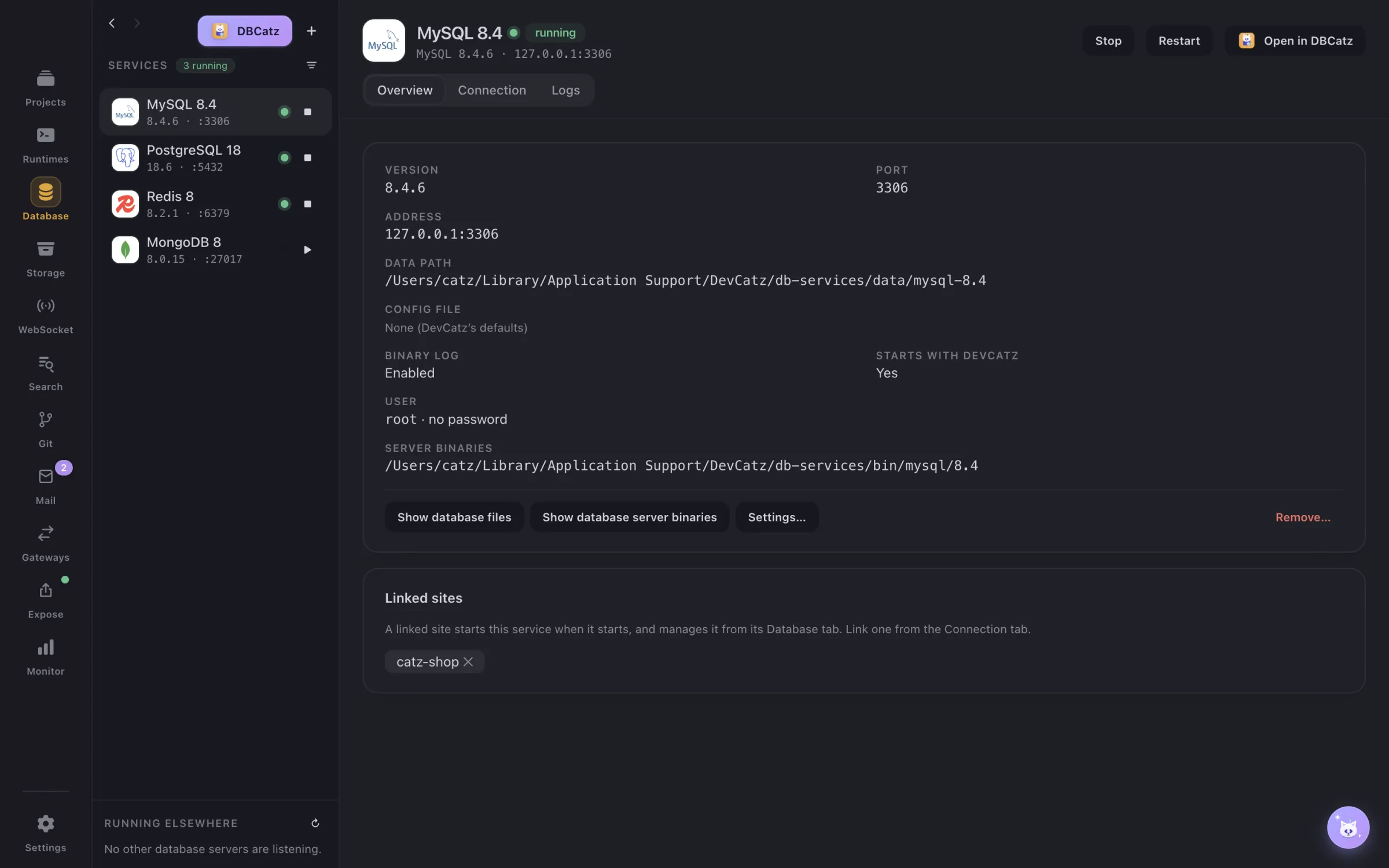
Each rail section installs, runs and manages real servers on your Mac — any number of instances, any version, with logs. No Docker or Homebrew juggling.
MySQL · MariaDB · PostgreSQL · Redis · Valkey · MongoDB · Elasticsearch · SQLite
Instances with their own version, port, socket and autostart. Finds servers from DBngin, Herd, Docker, Homebrew and Postgres.app too. A Redis DB index per site, with clash warnings.
RustFS · MinIO · SeaweedFS — public / private buckets, https://s3.<tld> + console
Test uploads and S3 code locally with a file browser and drag-and-drop, without an AWS bill or an internet connection.
Sockudo (Pusher protocol) · Centrifugo · Mercure · NATS · Laravel Reverb — per site or shared
Live inspector, a test client for private / presence auth and a publish box: realtime features are testable before they ship.
Meilisearch · Typesense · OpenSearch · Manticore · ZincSearch · Sonic
Indexes, import / export, API keys and a playground that searches as you type with filters and facets. Meilisearch tasks and backups included.
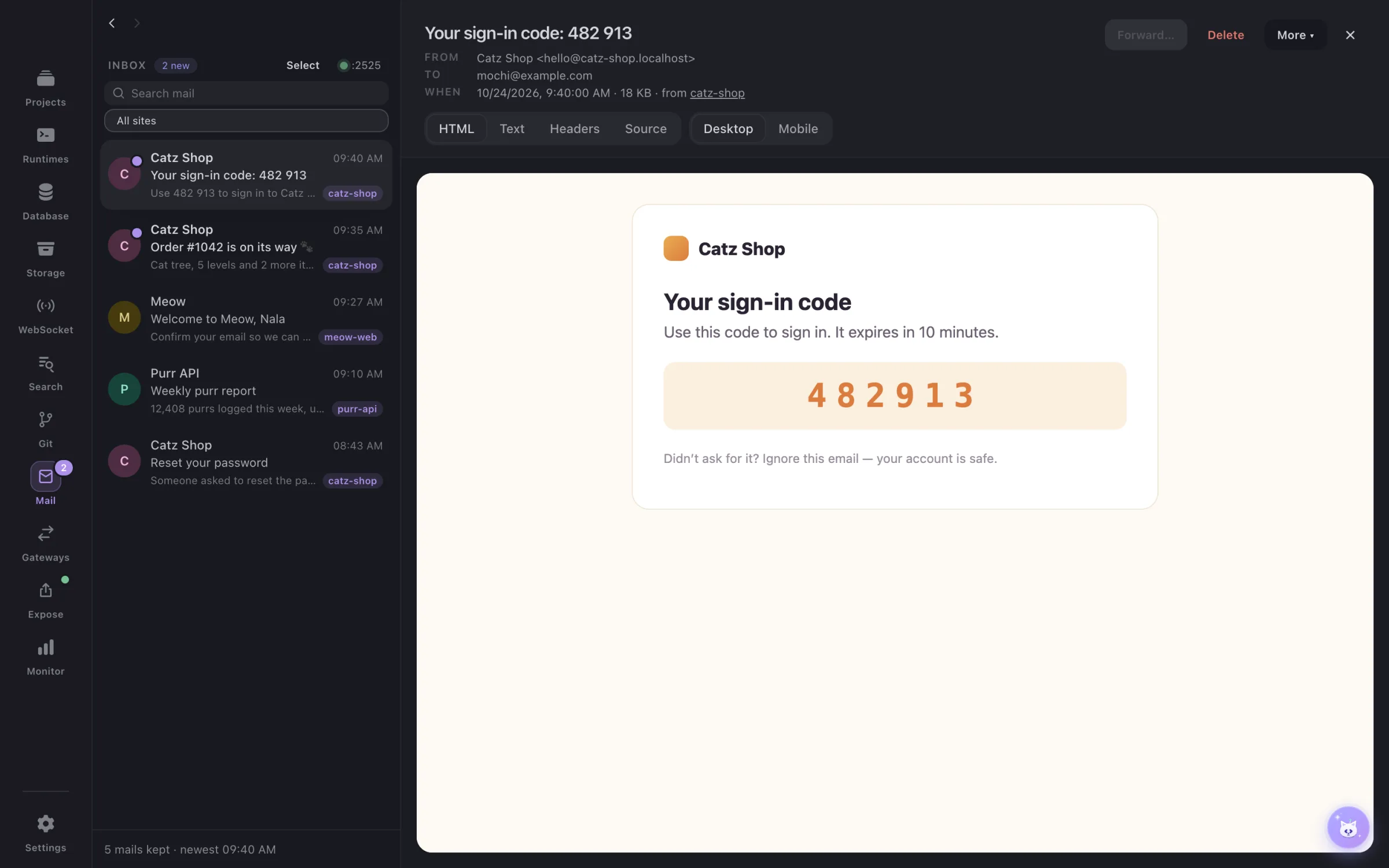
Local SMTP catcher · inbox at https://mail.<tld> · HTML + mobile preview and checks
No test mail ever reaches a real inbox. Forward a single mail to a real address when you need to see it on a phone.
Cloudflare Quick Tunnels · your own Cloudflare domain · Expose · ngrok
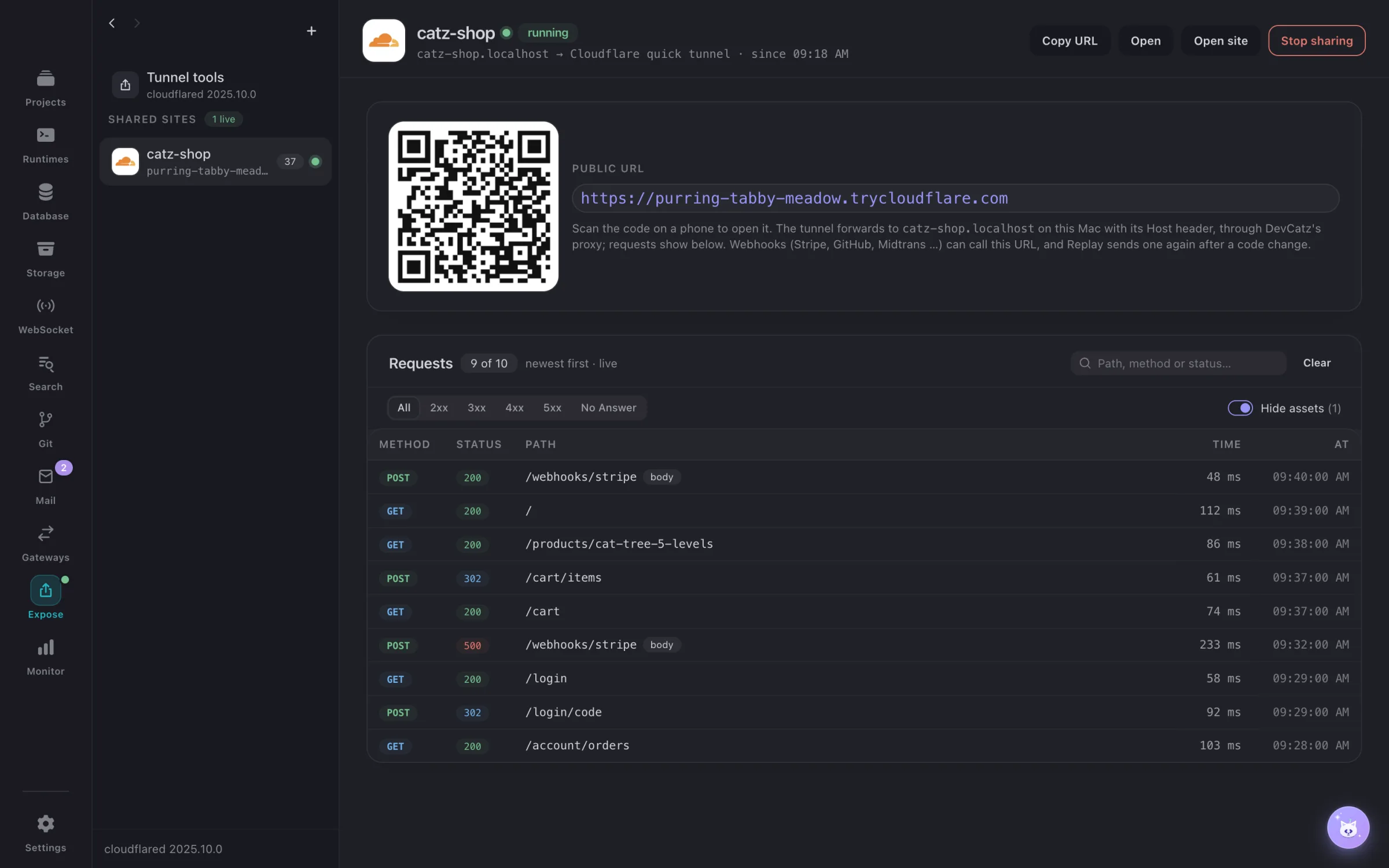
Share a site with a client, test a webhook (Stripe, Midtrans…) or open it on your phone — with basic auth, expiry, a QR code and a request inspector with replay.
WhatsApp (GOWA, WAHA) · email servers (Stalwart, Postal) · push (ntfy, Gotify) · SMS (Jasmin + catcher) · Telegram Bot API server
OTP and notification flows run end to end on your Mac, with inspectors and webhooks to your sites — no paid provider while you develop.
GitHub · GitLab · Gitea / Forgejo · Bitbucket (+ self-hosted) · SSH keys
Clone as a site, commit, branch, stash, tag, rebase with a conflict walkthrough, and open pull requests with their checks — without leaving the app.
CPU, memory, disk I/O, network per site, service and Docker container · 1 h – 24 h charts
See which site eats the CPU, which ports are open, and get a macOS notification when something crosses a limit.
Status and controls for every site and service
Start, stop and open things without switching windows.
Per site
Tabs appear when a project uses the feature — a site with an S3 library gets Storage, a site with Socket.IO gets WebSocket.
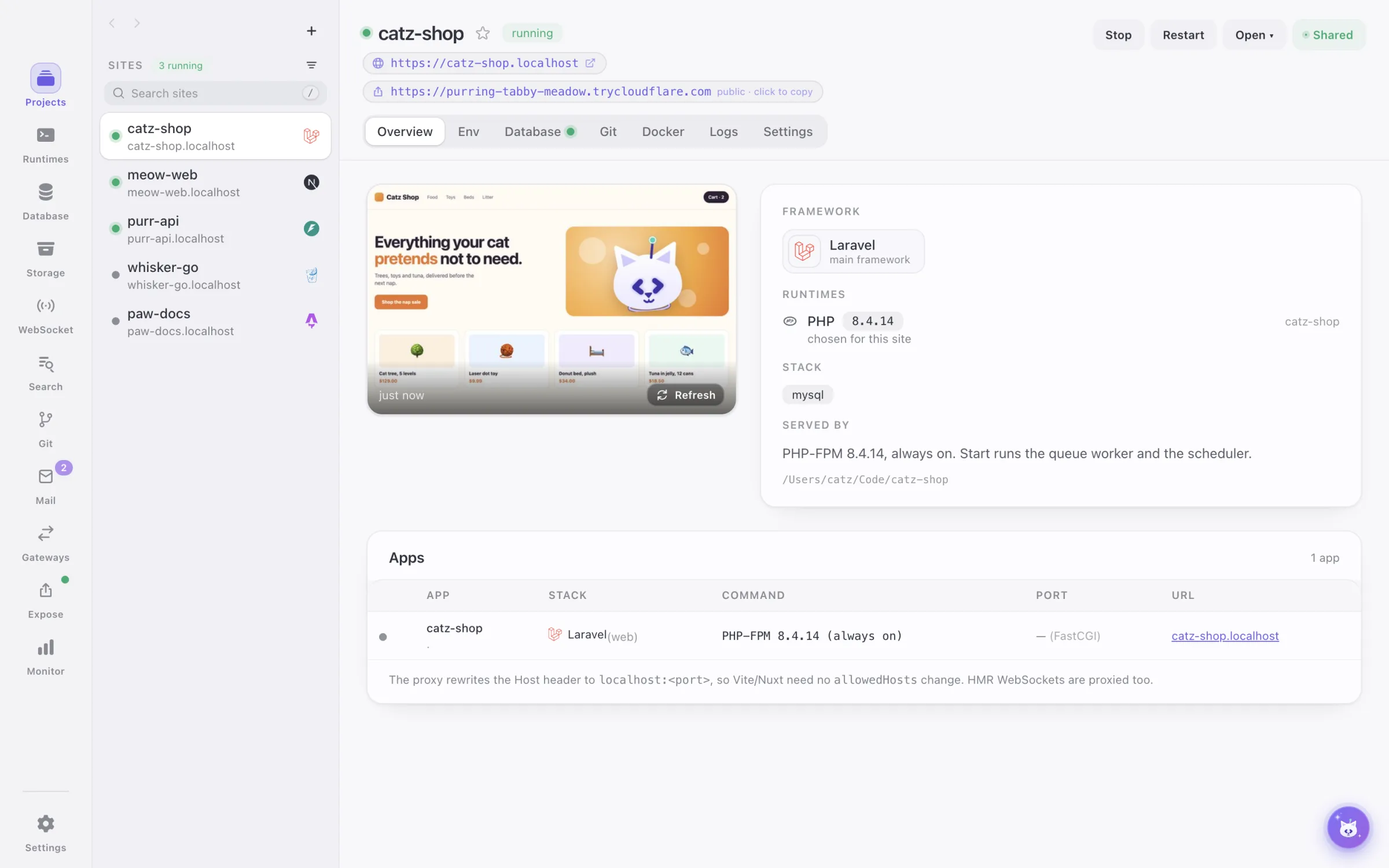
Framework with logo · apps · ports · runtimes it needs · start / stop / restart
Everything about the site on one screen; when it crashes, Explain with AI reads the failing lines.
The site’s .env files
Edit, compare with .env.example, let AI explain odd keys.
DB from .env (Laravel, Django, Prisma, WordPress…) · artisan migrate / seed, Django, Alembic, spark, Yii, Doctrine, CakePHP, WP-CLI, Drush, Knex, Drizzle, Sequelize
Link a DevCatz instance (starts with the site), copy ready .env lines or write them with a preview, run migrations as buttons, Open in DBCatz.
Flysystem · AWS SDKs · boto3 / django-storages · MinIO clients
A bucket and the .env lines for it, in one step.
OpenAPI files in the project · the document each running app serves · Laravel’s route list
Finds where the site’s API is described — and adds Scramble (Laravel) or @nestjs/swagger (NestJS) when there is none. Open in DialCatz turns it into requests.
Socket.IO · ws · Echo / pusher-js · Reverb · Channels · gorilla
Live connection test, Laravel broadcasting checks and a test broadcast.
Scout · Meilisearch / Typesense / OpenSearch / Manticore clients · InstantSearch
Engine status, a search-only key in .env, Scout import / flush.
Changes · commits · branches · worktrees
Commit messages and PR descriptions written from the diff, in your repo’s style. Each worktree runs as its own site on <branch>.<site>.localhost, side by side.
Laravel · Django · Flask · Nodemailer · Go
Mailer .env, send a test mail, the site’s last mails.
WhatsApp and the other gateways the .env points at
Wire a gateway to the site with Write to .env.
OrbStack · Docker Desktop · Colima · Rancher Desktop · Podman · Finch — targets: local test, Dokploy, Coolify
Generates Dockerfile, docker-compose.yml and .dockerignore from the detected stack (preview / diff, never overwrites silently), then Build & Up with logs. From local to deploy-ready in one click.
Dev server and task output · Laravel log viewer
Errors where you can read them, with Ask AI on the failing lines.
Domain · runtime version · ports
Per-site overrides without touching global settings.
Better together
DevCatz hands its services to DBCatz, the companion database client. They show up as “DevCatz services” with live status; Open in DBCatz from any site, Open in DevCatz from any connection. If DBCatz is missing, DevCatz offers to download and install it. DialCatz turns every site into an environment, and DoCatz will run its containers.

 One file is the whole contract.DevCatz writes the services it runs; DBCatz follows the file and lists them. Nothing talks to anything.
 Sites become DialCatz environments.Each site’s URL and .env names; routes from Laravel or the OpenAPI document the site serves.
 DevCatz runs its containers on DoCatz.soonDatabase containers show up in DBCatz, HTTP services in DialCatz.
DBCatz
From the Database rail or a site’s Database tab straight into the right database — DevCatz installs DBCatz first when it is missing.
DBCatz
When DevCatz stops a service its DBCatz tab shows Disconnected with a Reconnect button.
DialCatz · baseUrl = the site’s https://*.localhost · .env variable names, values stay on your Mac
Pick the site in DialCatz and start calling it — no ports or hosts to copy; web and api apps of a monorepo each get theirs.
DialCatz · Laravel route list · the OpenAPI document the site ships or serves
From a site’s API tab straight to its requests, split into api and web folders, on the right environment. DevCatz installs DialCatz first when it is missing.
DoCatz · docker context
The Docker tab picks DoCatz as the engine when it is installed — Build & Up, logs and Monitor included.
DoCatz · DBCatz · DialCatz
Database containers show up in DBCatz, HTTP services become DialCatz environments, like DevCatz services today.
Ready for adoption
macOS 13+ on Apple silicon and Intel; Windows is on the way. No account, no licence key — all cats, no catch.
Apple siliconIntel MacWindows · soon