API client

The API client your team keeps in its own den.

Dial an endpoint. Hear it purr.

Free and open source, the API client of the family: collections, environments, tests and history on your Mac — and DialCatz Den, a server your team runs itself, so nobody else holds your requests or your secrets. Your DevCatz sites arrive as environments, their routes as collections.

GET catz-shop.localhost/v1/cats/mochi · 200 OK · Purr. · 51 ms · tests 5/5

macOS 13+Apple silicon + IntelWindows soonFree, open sourceAI-connected ✦
  • REST
  • GraphQL
  • WebSocket
  • JSON
  • XML
  • Form
  • Multipart
  • Binary
  • OpenAPI
  • Swagger
  • Postman
  • cURL

In the app

This is DialCatz.

Real screens from the app — no stuffed cats, no mock-ups.

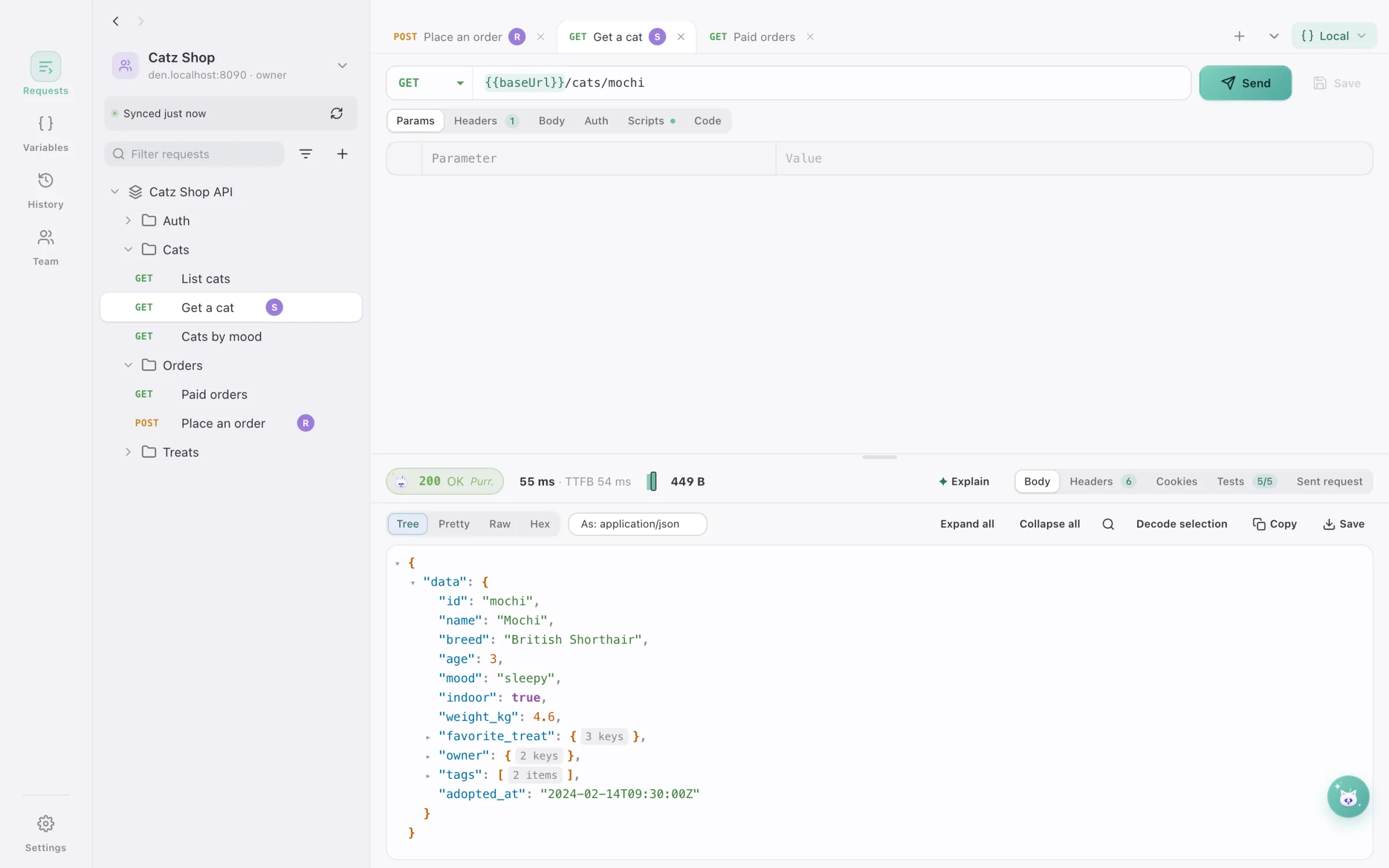
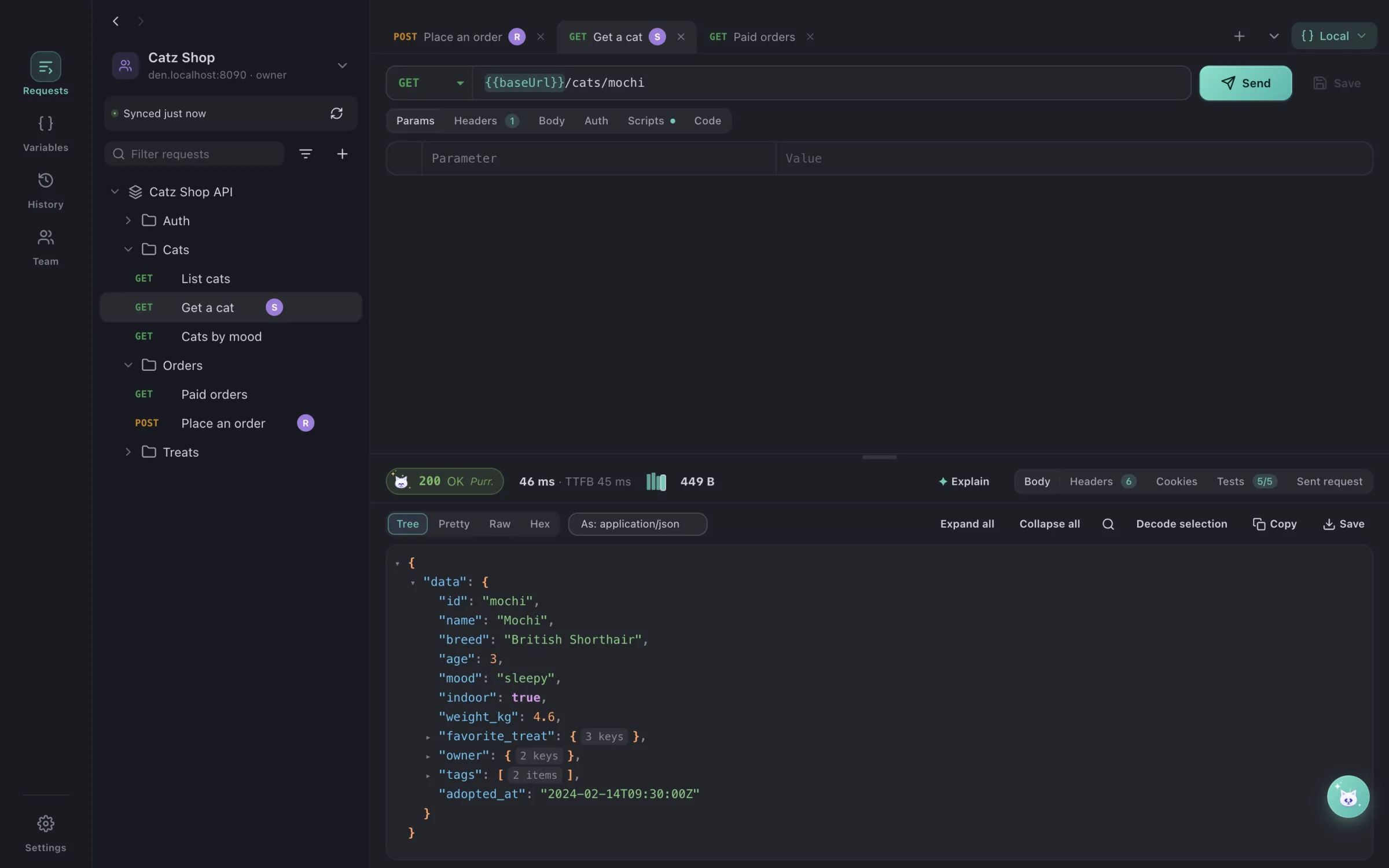
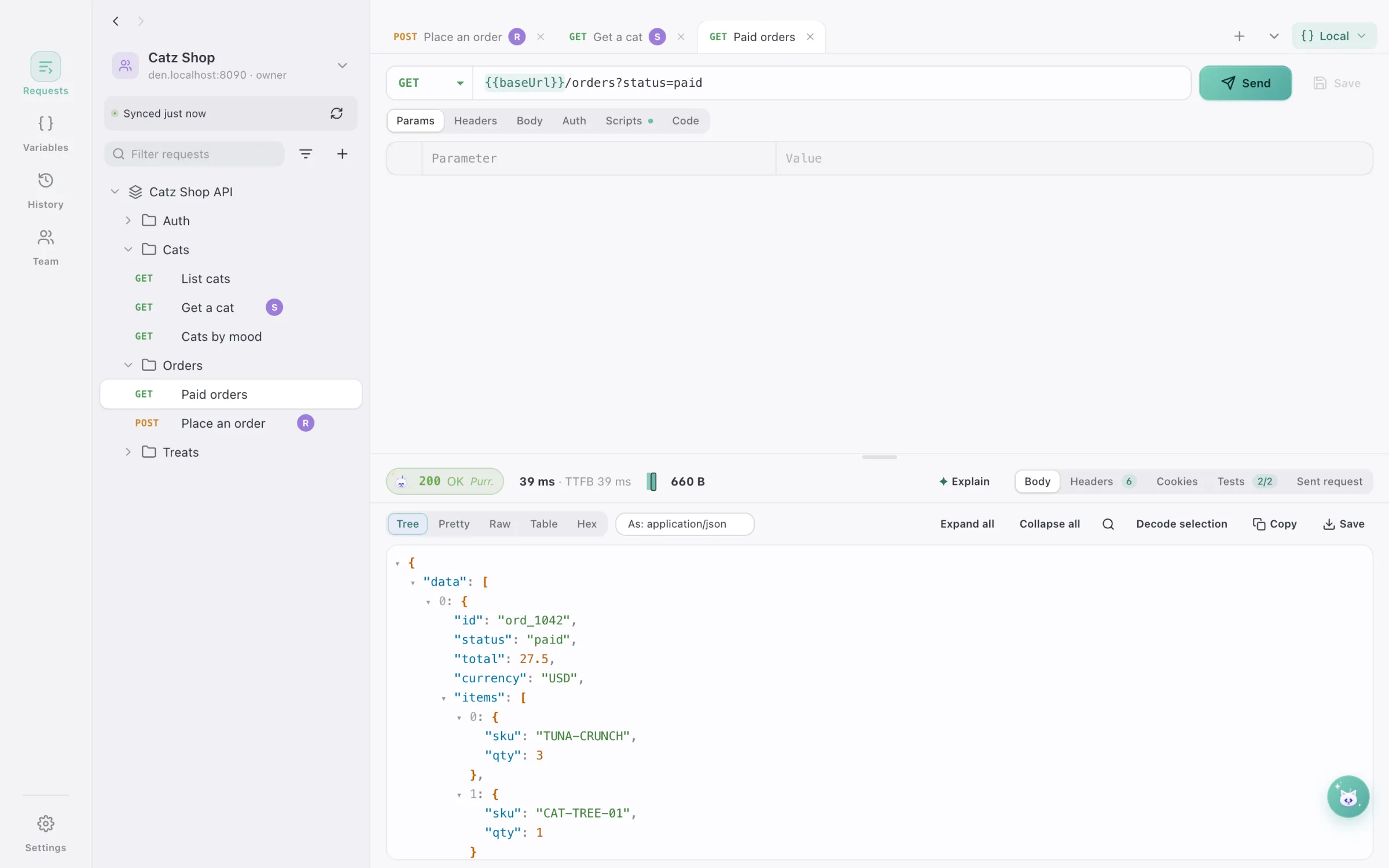
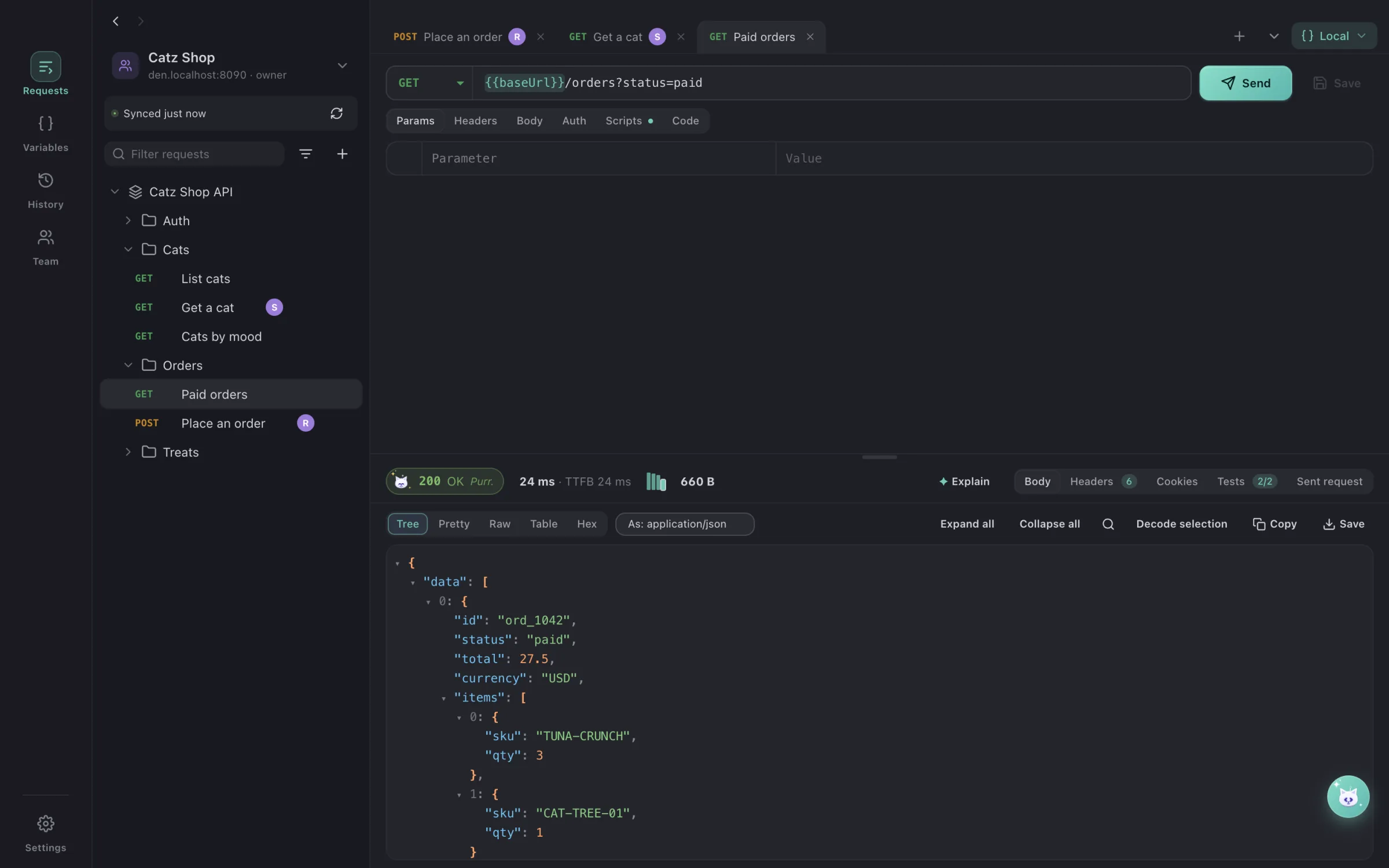
A request to the Catz Shop API in DialCatz with its JSON response and passing tests
01 · DialA request, and the cat purrs back.Variables in the URL, the response as a tree you can fold, timing to the millisecond and the tests that passed — 200 OK, Purr.
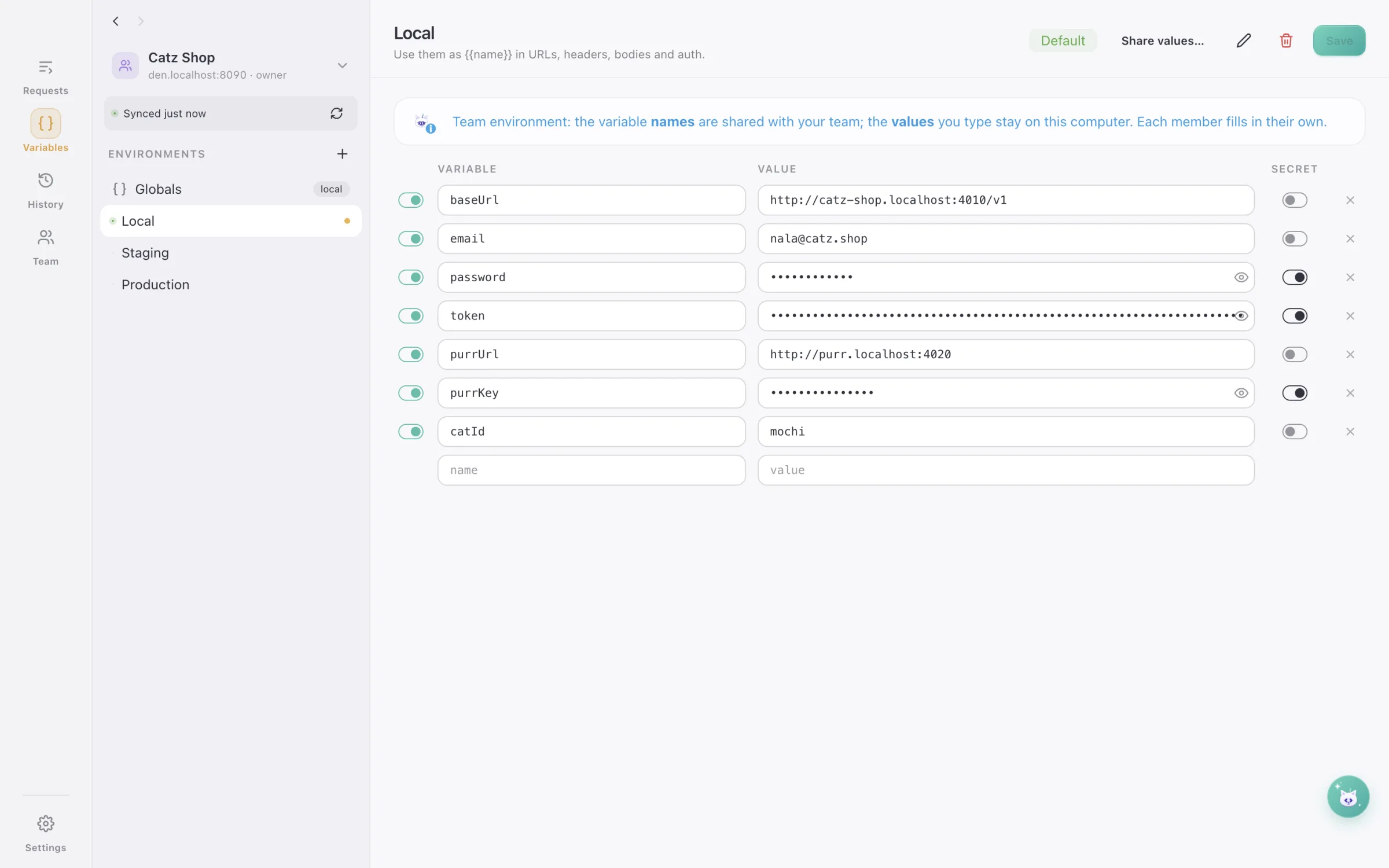
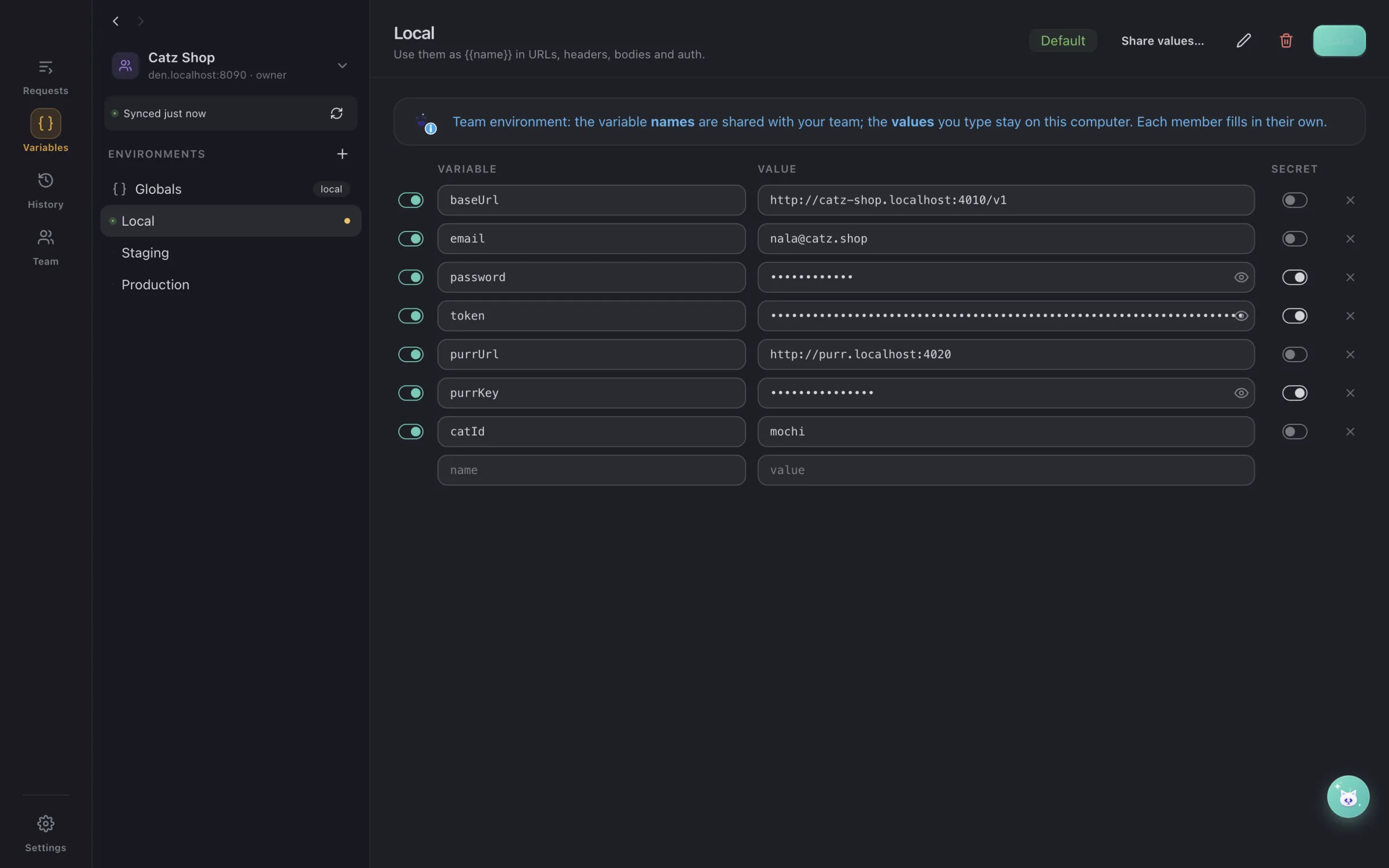
A team environment in DialCatz with secret values hidden
02 · SwitchLocal, staging, production — one click apart.The same requests on every environment; secrets hidden, and in a team only the names are shared — the values stay on your Mac.
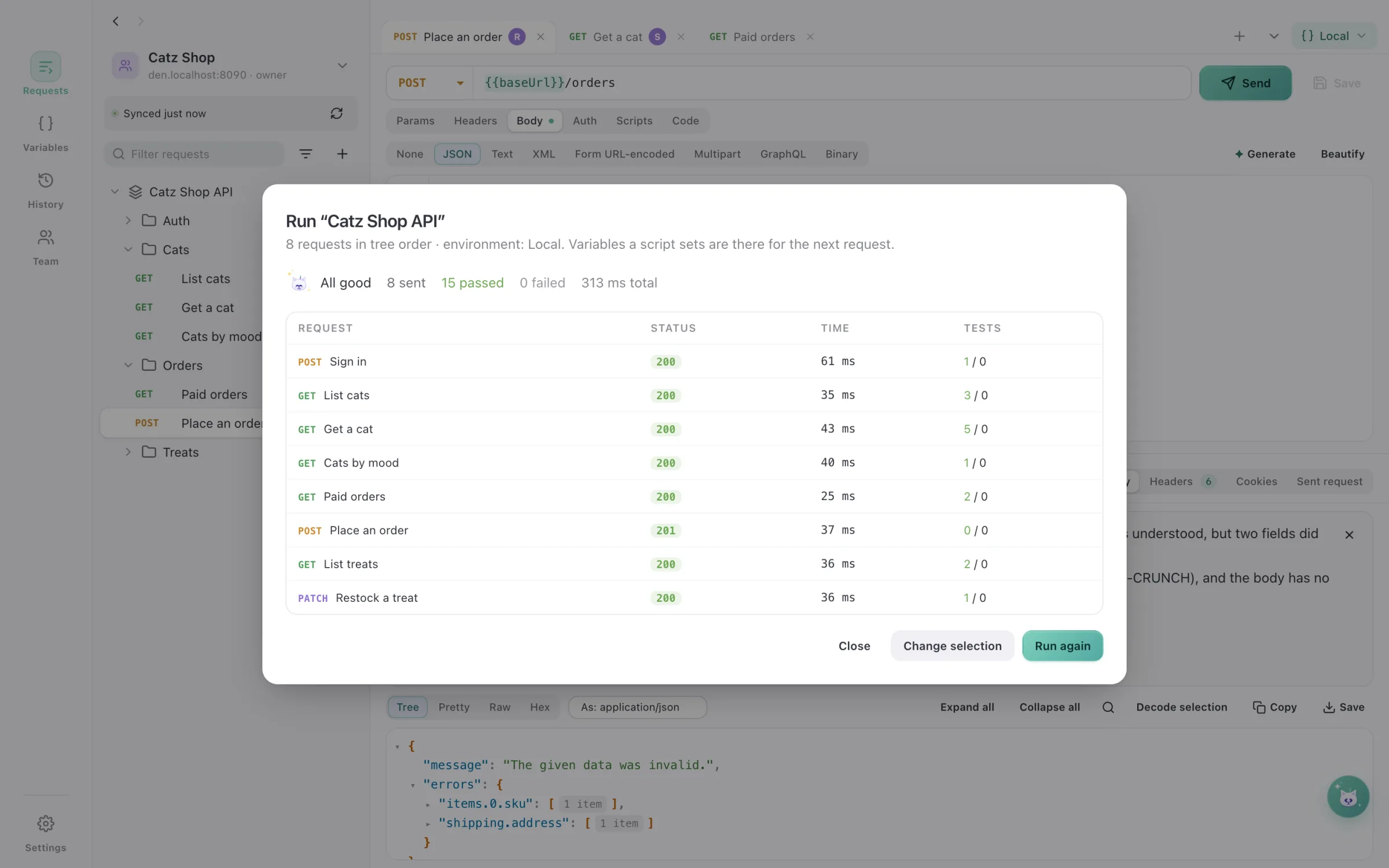
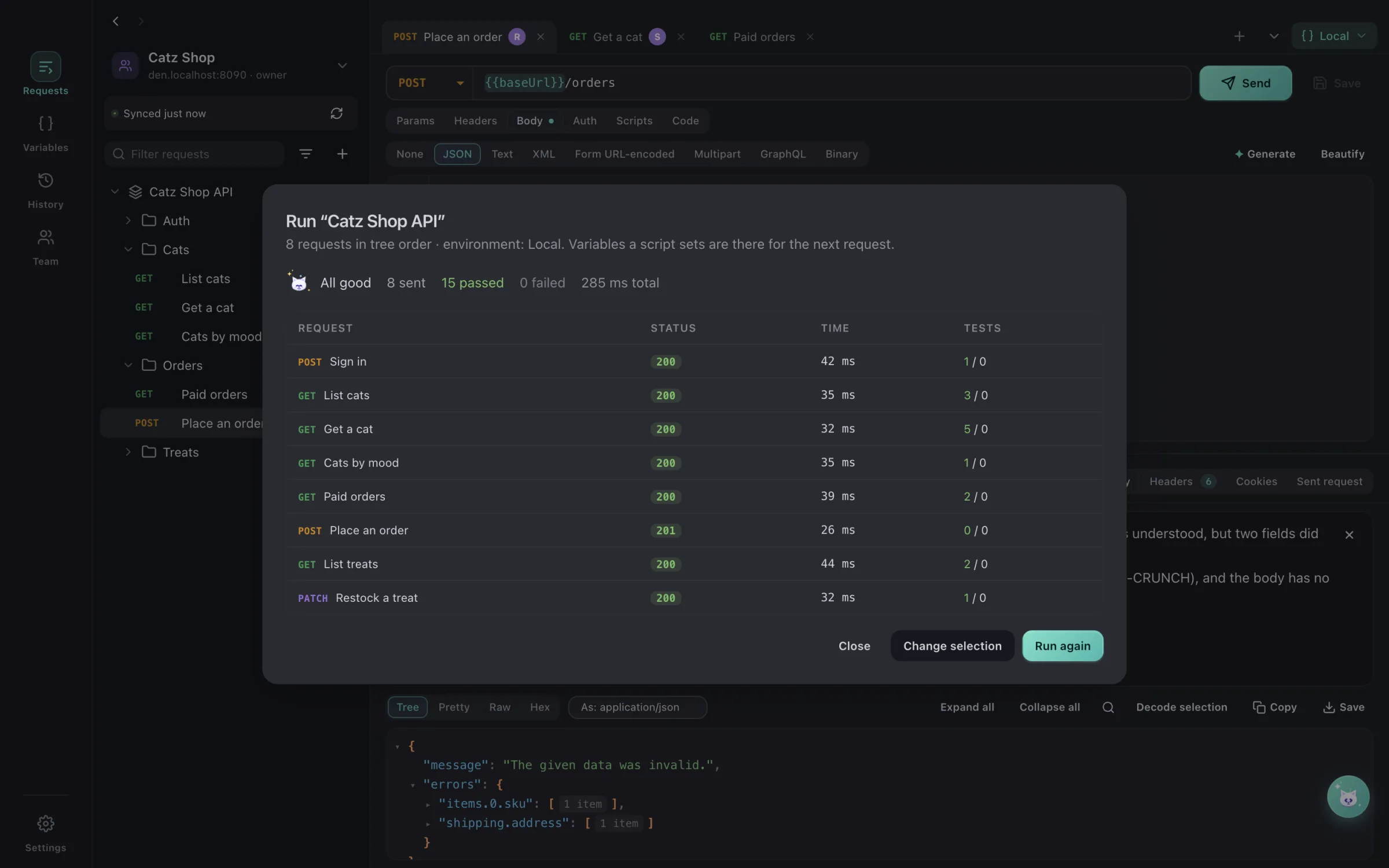
The DialCatz collection runner with every test passing
03 · TestThe whole collection, every cat home.Run a collection in tree order; the token Sign in saves is there for the next request, and every test reports in.
A team workspace synced through DialCatz Den, with teammates on their requests
04 · ShareYour team, live, through your own den.A team workspace synced through DialCatz Den: Raka is on Place an order, Sari on Get a cat, and every change arrives within a second.
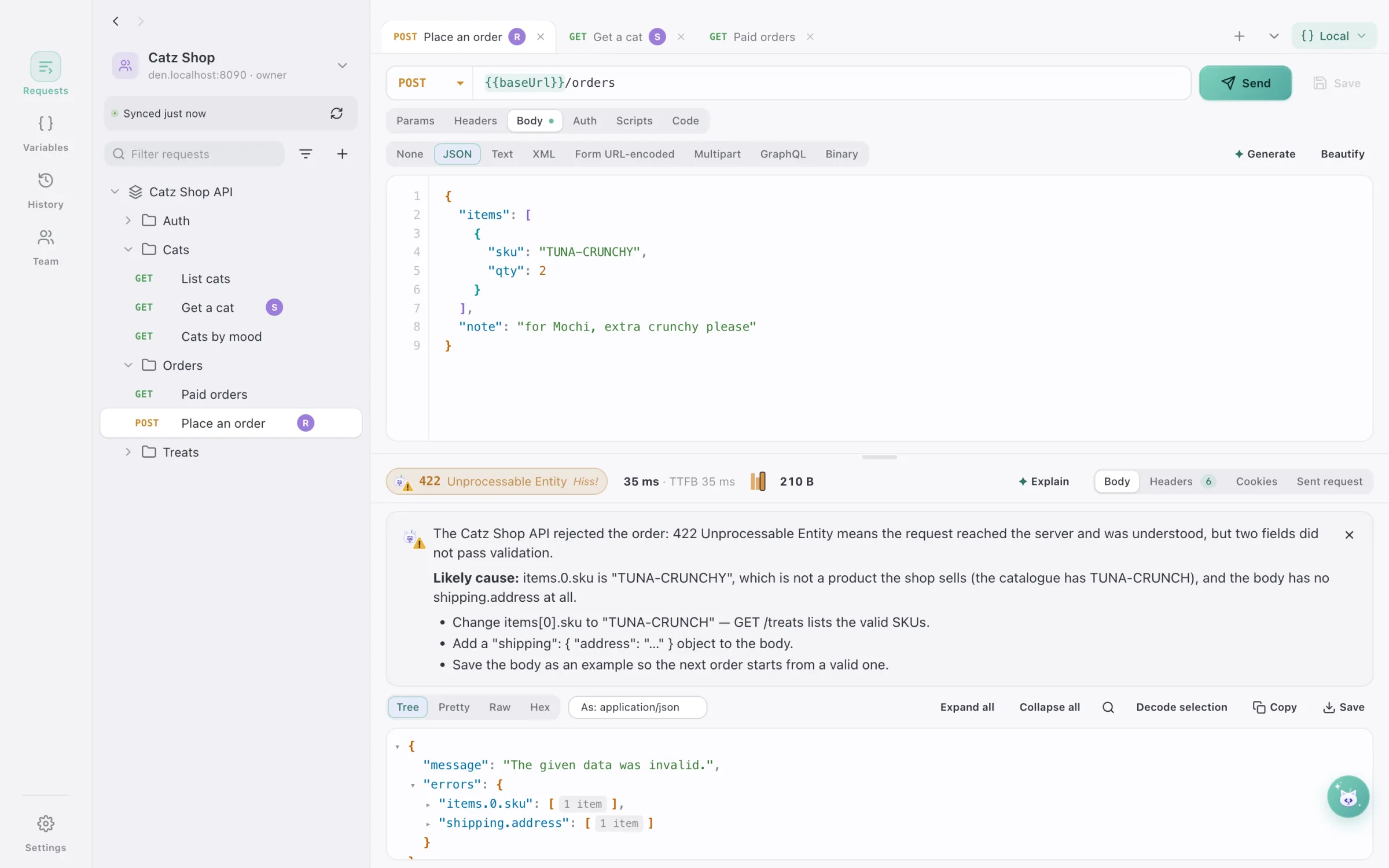
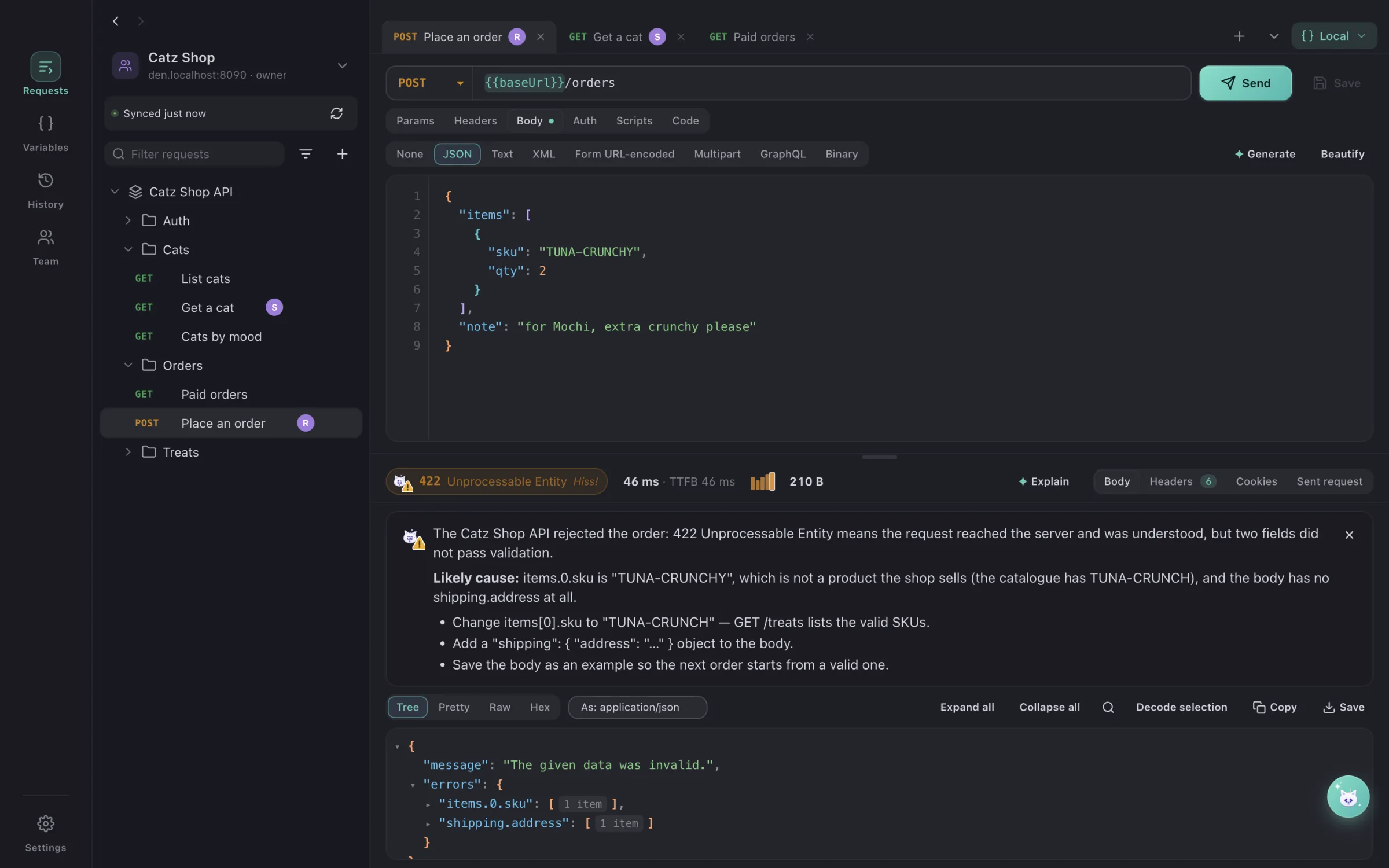
DialCatz explaining a 422 response with AI
05 · FixA hiss, explained in plain words.Explain reads the 422, finds the misspelt SKU and the missing address, and says exactly what to change.
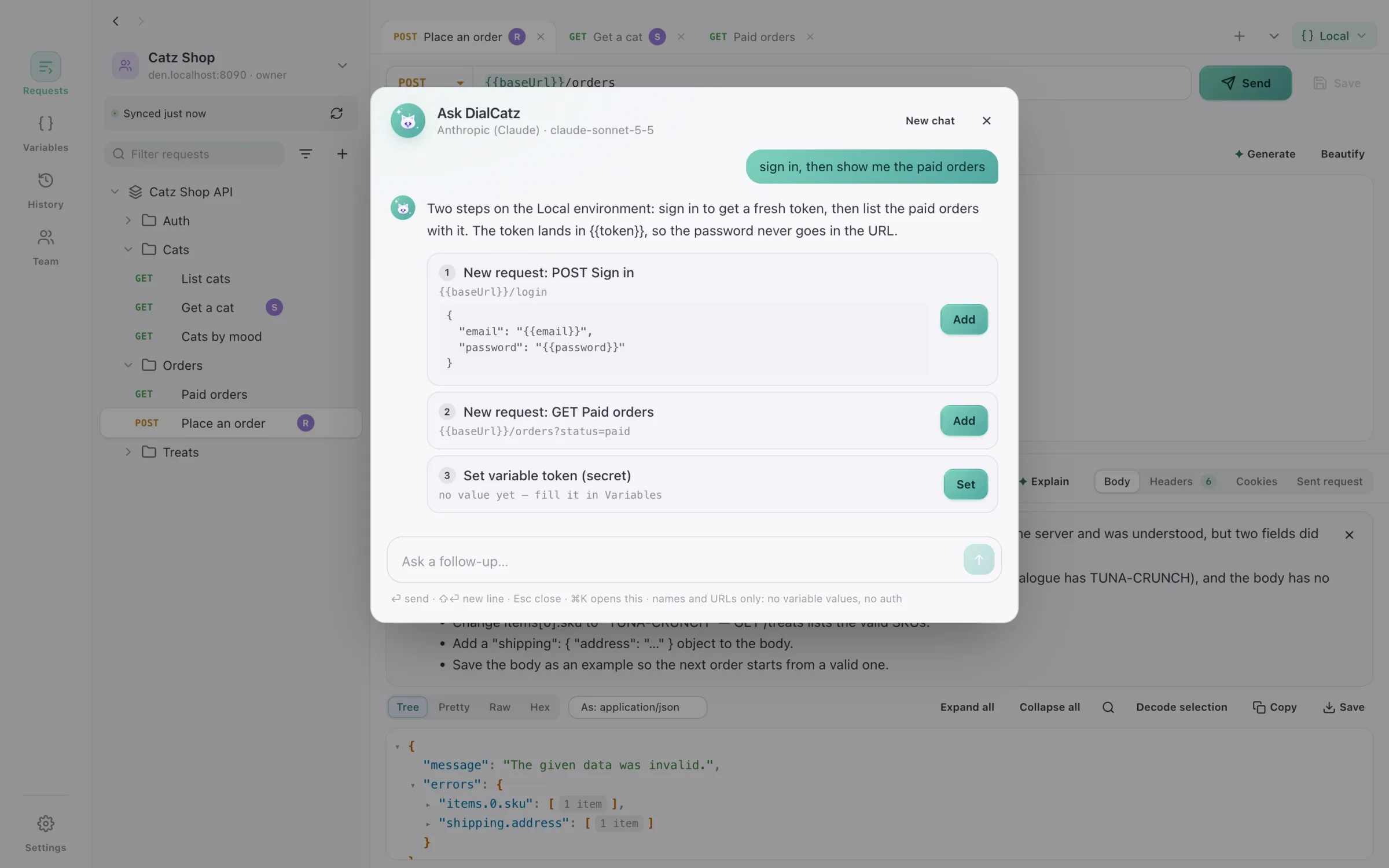
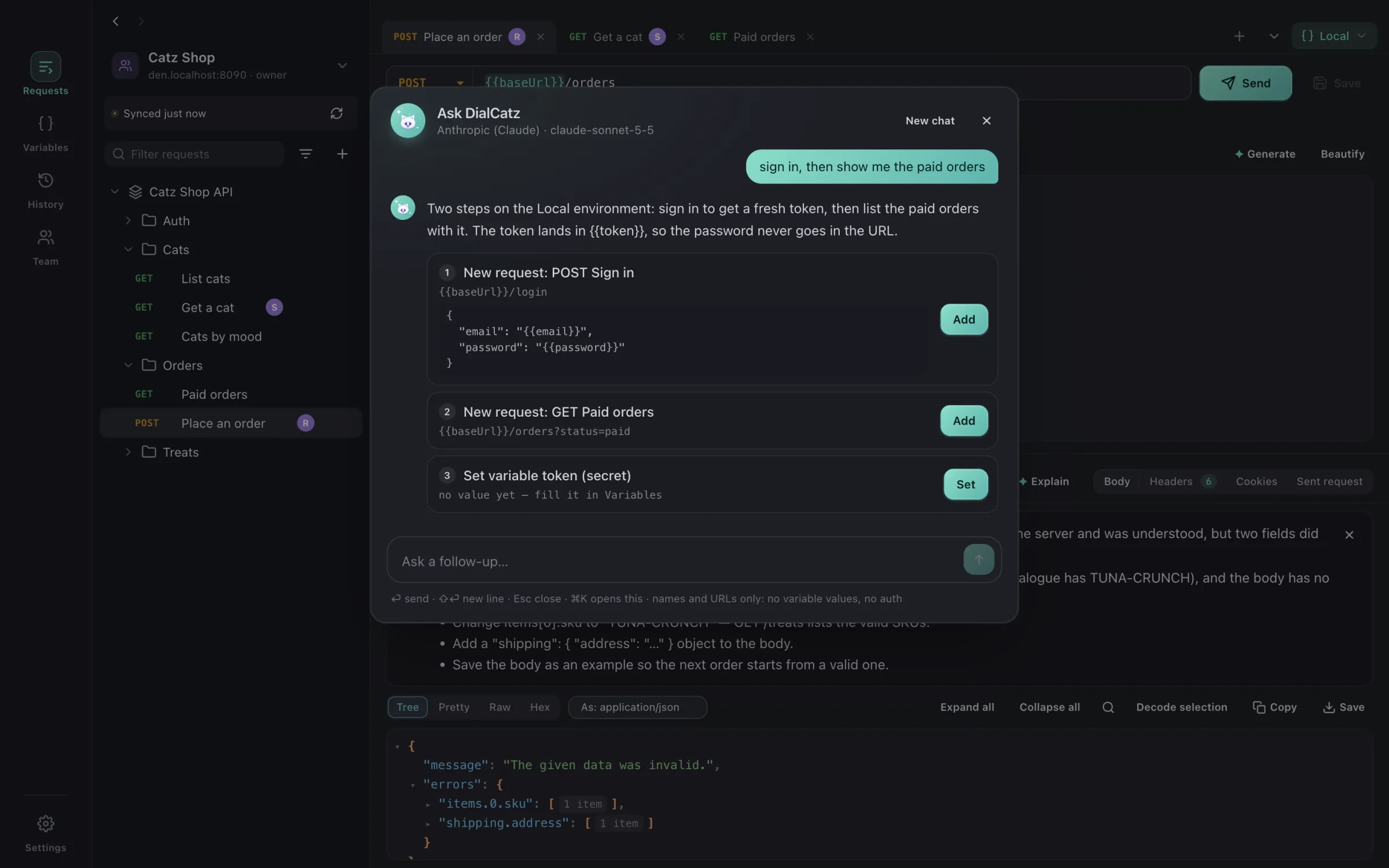
Ask DialCatz turning a plain request into new requests and a variable
06 · AskSay it. The cat dials it.Plain words become requests in your collection and a variable to fill in — each one a button, nothing sent until you press Send.

Requests and responses

Every kind of call, answered with a purr — or a hiss.

Requests leave from the app itself, not a browser: no CORS in the way, your local sites’ certificates accepted, every millisecond timed.

  • REST
  • GraphQL
  • WebSocket
  • JSON
  • XML
  • Form
  • Multipart
  • Binary
  • OpenAPI
  • Swagger
  • Postman
  • cURL

Requests that say it all

Params ⇄ URL · headers · JSON, XML, text, form, multipart with files, GraphQL, binary

Bearer, Basic and API-key auth, set once on a folder or collection and inherited below. Paste a cURL into the address bar and it becomes a request.

Responses you can read

JSON tree · pretty · raw · table · image and PDF preview · hex · base64

Expand and collapse any object, search, decode a selection, see cookies and the response-time history; 200 purrs, 500 hisses.

Sent the way servers see it

Redirects · gzip / br · timeouts · self-signed on request · 25 MB cap

DevCatz’s local certificate is trusted for the sites it serves, so https://*.localhost just works.

WebSocket

Connect · send · a live log

Talk to a socket next to the REST calls that open it, with the same variables.

Code, ready to paste

cURL · fetch

Every request as a command for the terminal or a snippet for the frontend.

History

Everything sent, with its response

Find the call that worked yesterday and open it again.

> sign in, then show me the paid orders

AI, with your collections

Say which call. The cat dials it — you press Send.

The same shared AI connection as DevCatz and DBCatz (Claude by default; OpenAI, Gemini, DeepSeek, Z.ai, Mistral, xAI, Groq, OpenRouter, Ollama and any OpenAI-compatible server). It knows your collections and environment by name, so plain words become requests you can read before anything goes out.

  • Nothing is sent on its own

    Every step is a button — add the request, set the variable — and you still press Send.

  • Names and URLs, never your values

    Ask DialCatz sees collection, request and variable names; tokens and keys in a response are masked before Explain sends it.

  • Keys stay in your Keychain

    Encrypted by macOS, never in a settings file.

  • A switch per feature

    Ask, Explain, Write tests and Generate each turn off on their own in Settings → AI.

Ask DialCatz turning a plain request into new requests and a variable
✦ Ask · Say it. The cat dials it.

Ask DialCatz (⌘K)

“sign in, then show me the paid orders”, “a request that creates an order”

Plain words become steps — new requests in the right collection, variables to fill in, requests to open — each one a button.

Explain a response

A 422, a 401, a CORS error, an odd shape

What came back, the likely cause in this request, and what to change — tokens and JWTs masked before sending.

Write the tests

From the response you just got

Status, timing, content type and the fields that matter, in DialCatz’s dc.test syntax; tokens and ids saved for the next request.

Generate a body

JSON · XML · text · form

Describe the payload and get realistic fake data in the body’s own format — no real people’s data.

Off until you turn it on · one connection, shared with every Catzoid app ·Claude (default)OpenAIGeminiDeepSeekZ.aiMistralxAIGroqOpenRouterOllamaany OpenAI-compatible server

The MCP with the cats insidesoon

MCatzP. em-catz-pee

One MCP server for the whole Catzoid family. Your AI assistant — Claude, Cursor or any other that speaks MCP — will be able to send a saved request and run a collection against the environment you pick in DialCatz, and reach the other cats you have installed through the same connection. One connection, every cat — and you hold the keys: only what you allow, nothing runs without you seeing it.

Works with ClaudeGeminiGPTGLM— any app that speaks MCP.

Meet MCatzP

Collections, variables and tests

A tidy toy box: every request where you left it.

Collections that stay in order

Folders · drag and drop · groups · favourites · sort by name · duplicate · export

Deleting a collection or folder asks for its name typed out, so a stray click never costs an afternoon.

Move in from anywhere

Postman v2 / v2.1 · a Postman data export · Postman workspaces with an API key, no export · OpenAPI 3 / Swagger 2 in JSON or YAML · cURL · DialCatz exports

Bring a whole team’s Postman workspace over in one import, bodies, auth and folders included.

Environments and globals

Local · Staging · Production · an environment per collection · secrets hidden

Click any {{variable}} to see its value and where it comes from; ⌘S saves the environment.

Tests and the runner

Pre-request and test scripts on requests, folders and collections · async tests · dc.test / dc.expect · dc.env.set · iterations and delay · results export as JSON or JUnit XML

Run a whole collection in tree order; a token one request saves is there for the next. Green means every cat came home.

Better together

Three cats, one territory: DevCatz sites dial themselves, DBCatz shows what changed.

DevCatz runs your sites on their own https:// names; DialCatz reads what it runs and turns each site into something you can call — and DBCatz shows what the call changed.

devcatzdialcatzSites become environments.Each DevCatz site arrives with its URL and the names of its .env variables; the values stay on your Mac.
dialcatzdbcatzCheck in DBCatz.After a request, Check in DBCatz opens the table the call just touched — at the row, when the URL or the JSON answer has its id.

Every DevCatz site is an environment

baseUrl = the site’s https://*.localhost · .env variable names · web and api apps of a monorepo

Pick a site and start calling it — no ports or hosts to copy.

Routes become a collection

Laravel (php artisan route:list) · OpenAPI documents the site ships or serves

Split into api and web folders when a site has both; bodies, params and auth taken from the spec.

Open in DialCatz

From a DevCatz site

One click from the site you are running to its requests, on the right environment.

Check in DBCatz

The table from the URL (/api/v1/order-items/42 → order_items, id 42) · a create’s id from the JSON answer · connection and database remembered per collection

See what the call changed without hunting for the row. The guess can be corrected per request; without DBCatz the button offers Get DBCatz.

One theme, one AI connection

Shared with every Catzoid app

Set the provider and the look once; DevCatz, DBCatz and DialCatz follow.

DialCatz Den · for teams

Your team’s den. Your server. Your secrets.

DialCatz Den is the self-hosted team server: each team runs its own, so nobody else ever holds the team’s collections or secrets. One small container — a Go binary with the admin panel inside, SQLite or PostgreSQL, about 30 MB.

DialCatz Den · one container
$ docker run -d -p 8080:8080 -v dialcatz:/data \
  -e DIALCATZ_PUBLIC_URL=https://den.catz-shop.test \
  ghcr.io/catzoidhub/dialcatz-den
DialCatz Den 0.1.0 · SQLite · listening on :8080
First start: open https://den.catz-shop.test to create the admin account

Up in one command.
Yours from the first request.

  • One container · about 30 MB
  • SQLite or PostgreSQL
  • Dokploy · Compose · docker run
  • AGPL-3.0 · no seat limits

No accounts for members

The admin adds a member · one invite link per device · its own token, kept in the system’s secret store

Opening the link in DialCatz connects that device; every change is signed with the member it belongs to. Lose a laptop, revoke that device — nobody else notices.

Secrets stay on each Mac

Environments sync variable names · values only when someone chooses Share values…

Every member fills in their own values, so the server never sees a token, a password or an API key unless the team decides to share one.

Live, like sitting together

A teammate’s push shows up within a second · who has which request open · a note when you both changed the same folder

Shared workspaces stay in step without “who changed this?” in chat. A token can be limited to some workspaces.

An admin panel that locks properly

Several admins by invite · passkeys · two-step codes · optional Google / GitHub sign-in

The panel that hands out access is the best-guarded door in the den.

Runs where your apps run

Dokploy from Git · Docker Compose · one docker run · SQLite or PostgreSQL

Deploy it next to the services it talks about; updates are a redeploy, data stays in its volume.

Open to the last whisker

AGPL-3.0 · no seat limits · no licence server

Read every line that guards your team’s requests. Ten people or two hundred, the den costs the same: nothing.

Ready for adoption

Take DialCatz home.

macOS 13+ on Apple silicon and Intel; Windows is on the way. No account, no licence key — all cats, no catch.

Apple siliconIntel MacWindows · soon

Also in the family: DevCatz · DBCatz · DoCatz